
175+ features.
Built from the field.
Every feature exists because someone in Indian real estate lost a deal without it. Designed on the sales floor, not in a boardroom.
7-day money-back · Price locked forever · No minimum users
What changes in week 1.
Same team. Same leads. Completely different outcome.
Day 1 — Every lead has an owner
Portal leads auto-captured and assigned in seconds. No more leads sitting in email. Every enquiry gets a call within minutes.
Day 2 — Every call is logged
Auto call detection tracks every dial. Connection ratio visible per rep. No more “30 calls kiye sir” without proof.
Day 3 — Follow-ups can’t be skipped
System reminders + overdue badges. Your team sees exactly who to call today. Warm leads stop going cold.
Day 5 — Site visits are verified
GPS-mandatory check-in. Timestamped. Outcome recorded. No more phantom visits — only real activity.
Day 7 — You have a live dashboard
Pipeline, calls, follow-ups, team performance — one screen. No more Monday MIS spreadsheet hell.
Day 7 — Your data is yours
Org-owned, not rep-owned. Data masking on. When someone leaves, the pipeline stays. Zero leakage.
All of this. One week. No training needed.
3-Tap Disposal + Auto Call Detection.
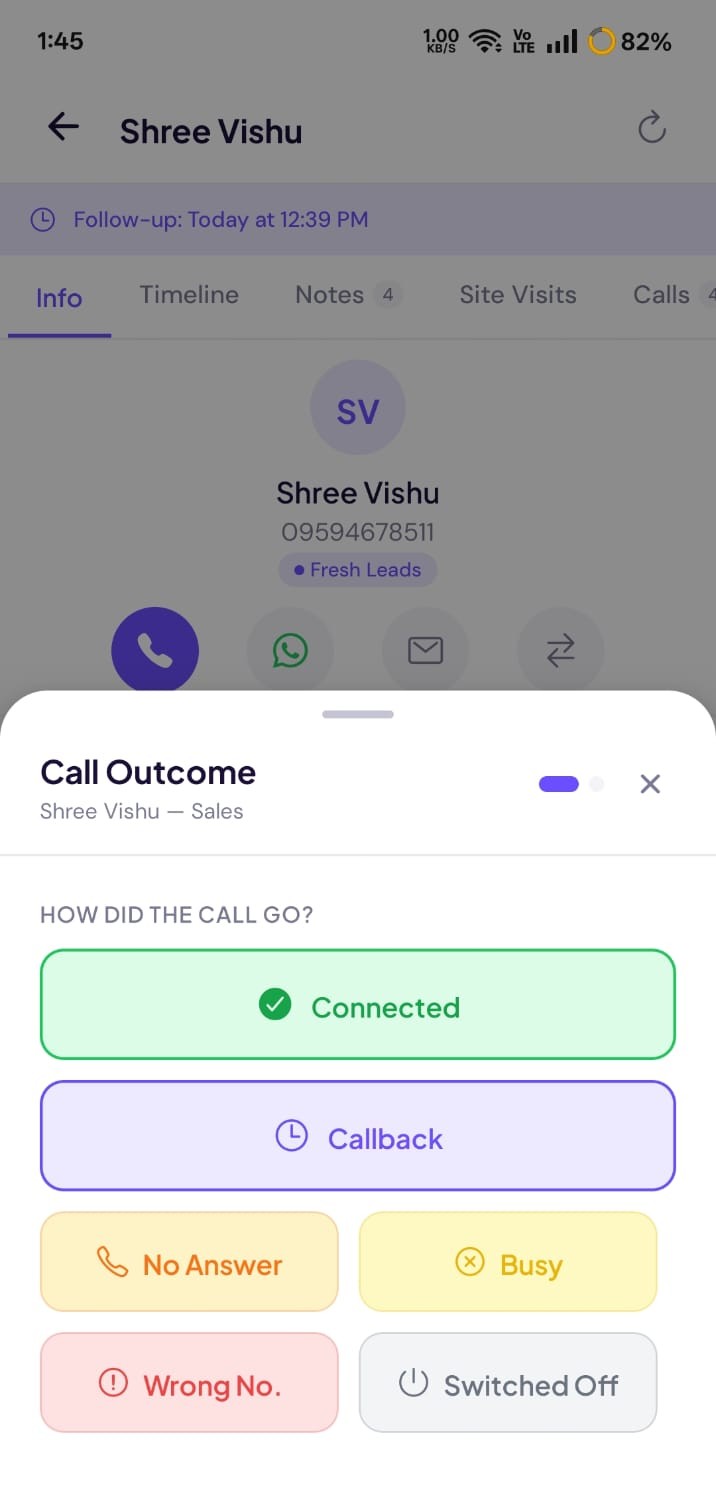
Your salesperson finishes a call. ClosingFox detects it automatically. A disposal form pops up — 3 taps: outcome, next action, date. Done. No forms. No typing. No forgetting.
Kanban Pipeline + Booking Prospect Scoring.
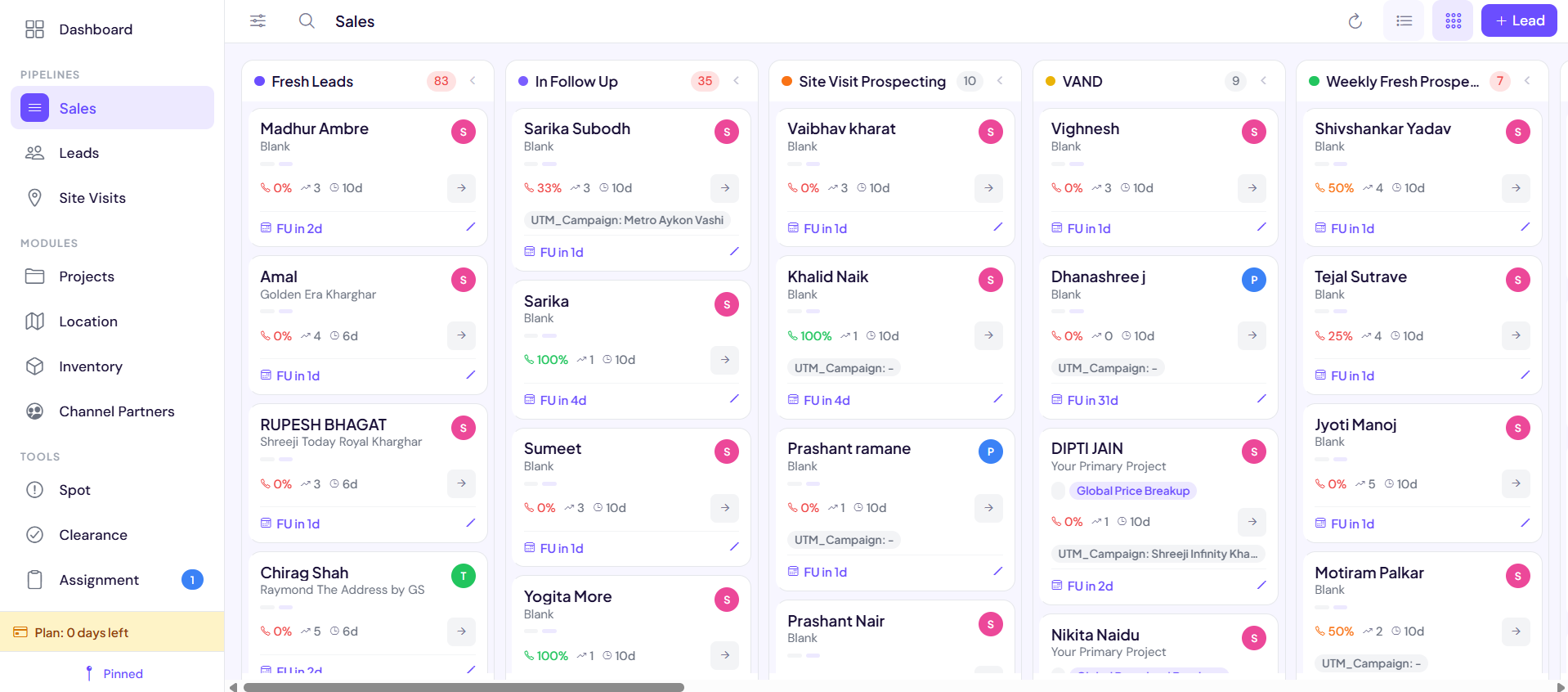
See every lead in every stage. Drag and drop between columns. Red badges show overdue follow-ups. And the algorithm quietly scores which leads are most likely to book — so you know where to focus.
Spot System. Flag at-risk leads before they die.
A “Spot” is a red flag on a lead — placed by a manager, the system, or a trigger rule. It means “this lead needs attention NOW.” Overdue follow-up? Spot. Stale for 7 days? Spot. Manager suspicious about activity? Manual Spot. Nothing hides.
Fox Focus — your AI sales coach.
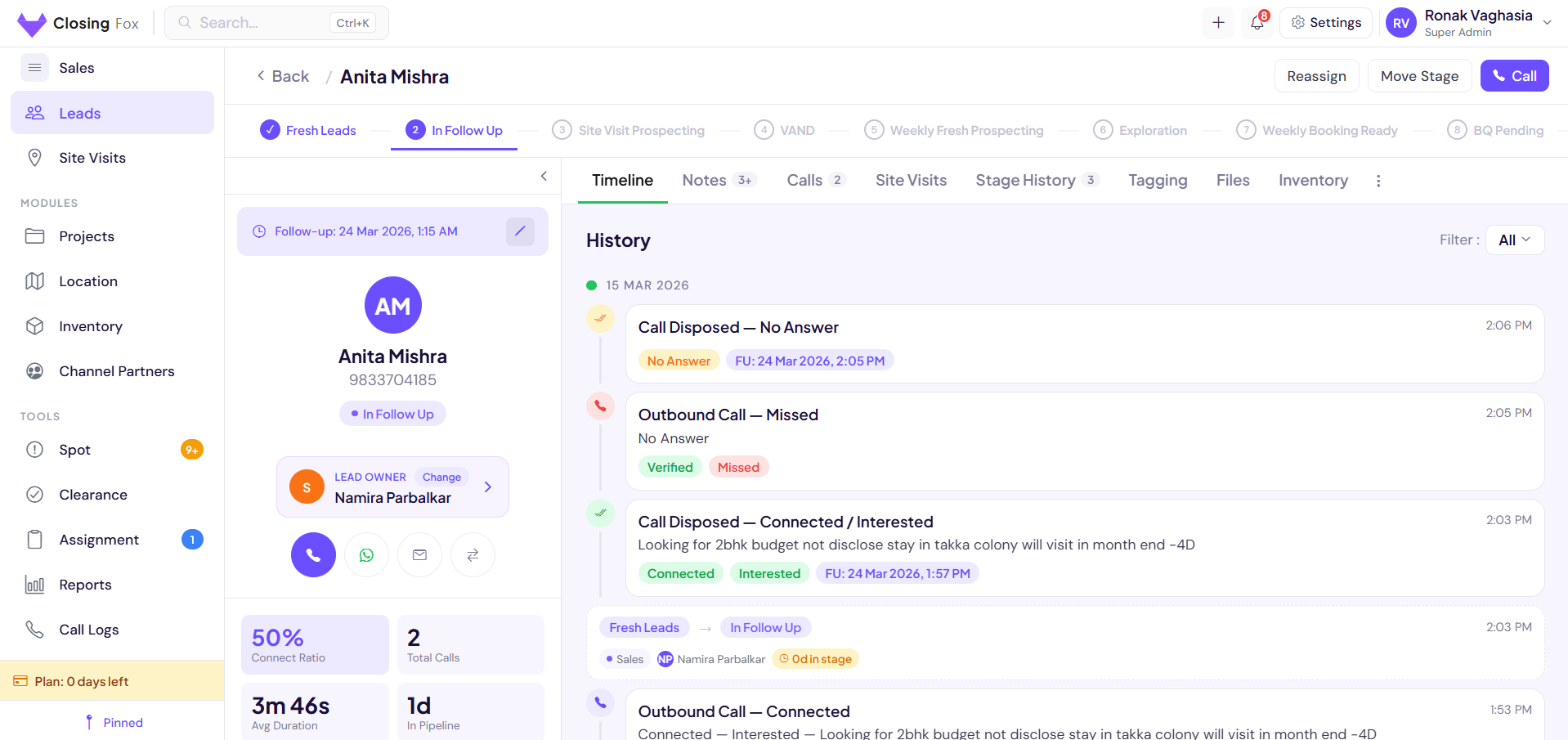
Every rep opens ClosingFox to one lead at a time — the hottest one. Fox Focus reads the lead’s full history and says exactly why to call now, what to say on the call, and what to send on WhatsApp. No dashboards to decode. No prompts to write.
See all 175+ features live with your data.
15-min demo. No pitch deck. Just the product.Lead Capture
Every lead. Every portal. Auto-captured.Webhook Auto-Capture
Leads from 99acres, Housing.com, MagicBricks, Meta Lead Ads, Elementor forms — captured instantly via webhooks. Zero manual entry. 6 PORTALSInstant Push Notification
New lead arrives → push notification to assigned rep in under 5 seconds. No email delay. No missed leads.Duplicate Detection
Phone number or email match? System flags it. No duplicate entries. No wasted calls on the same buyer.Manual Lead Entry
Walk-in, referral, or cold call? Add a lead in 15 seconds. Name, phone, project — done.Source Tagging
Every lead auto-tagged with source: which portal, which campaign, which CP. Attribution is automatic.Bulk Import
Migrating from Excel or another CRM? Import leads in bulk via CSV. Map your columns. Done in minutes.Meta Conversions API
When a lead reaches a stage you choose (Site Visit, Booking…), ClosingFox fires a server-side conversion back to Meta — so your ad campaigns optimize on real bookings, not just form fills.
Assignment & Automation
Right lead. Right person. Right now.Round-Robin Assignment
Leads distributed equally across team members. Automatic rotation. No favoritism. No manual picking.Conditional Rules Engine
Assign by source, budget, project, location, or any custom field. “99acres leads from Thane → Amit.” Fully configurable.Escalation Rules
Lead not contacted in 2 hours? Auto-escalate to team lead. Not in 4 hours? Goes to manager. Configurable thresholds.Broadcast Assignment
Send lead to all reps. First to claim it gets it. Creates urgency. Best for hot portal leads.Weighted Distribution
Top performers get more leads. Assign by capacity or performance ratio. Reward your closers.Re-Assignment
Manager can reassign any lead with one tap. Transfer with full history — calls, notes, visits preserved.Calls & Follow-Ups
Every call tracked. Every follow-up enforced.Auto Call Detection
Android detects calls automatically — incoming, outgoing, duration, timestamp. No manual logging. No lying. ANDROID3-Tap Disposal
After every call: Connected/Not → Outcome → Next date. 5 seconds. If they won’t fill a 10-field form, they’ll tap 3 buttons.Connection Ratio
% of calls that actually connected. Filter by rep. Green >70%, Red <40%. Data-driven coaching.Follow-Up Reminders
Push notifications for upcoming follow-ups. Overdue = red badge on dashboard. Manager sees compliance %.Call Notes & Timeline
Every call logged in the lead timeline with outcome, notes, and duration. Full conversation history at a glance.Missed Call Tracking
Incoming calls from leads that weren’t answered — flagged for callback. No buyer inquiry goes unanswered.Caller ID Overlay
Incoming call? See the lead’s name, project, stage, and budget right on your screen. Know who’s calling before you pick up.
ANDROID1-Tap WhatsApp
Message any lead in one tap — opens WhatsApp or WhatsApp Business with a stage-aware template pre-filled (fresh, follow-up, post-visit, negotiation). AI can draft it too.
Site Visits
Verified. Timestamped. GPS-proven.GPS-Mandatory Start
Visit can only start with GPS location captured. No GPS, no visit logged. Proof over claims.Duration Tracking
Visit start time, end time, and total duration — all auto-tracked. Know how long the site visit actually lasted.Visit Outcomes
Interested, Not Interested, Revisit, Booking Discussion — structured outcomes that feed into pipeline stages.Auto-Mirror Notes
Notes from the visit auto-saved to the lead timeline. Entire team sees what happened without asking.Visit Scheduling
Schedule future visits from the lead detail screen. Calendar view for daily site visit planning.Fresh vs Revisit
Automatically tags whether this is the buyer’s first visit or a follow-up revisit. Tracks visit history per lead.Dashboard & Pipeline
Your entire operation. One screen.KPI Dashboard
Overdue, due today, new leads, stale leads, pipeline value — all live. Color-coded. Tap any number to see the list.Smart Nudges
“3 leads overdue. Take action.” Context-aware prompts that tell your team exactly what needs attention right now.Activity Feed
Last 24 hours: calls made, disposals logged, visits completed, leads moved. See team activity in real-time.21-Column Lead Table
Name, phone, source, stage, last contact, next follow-up, assignee, budget — 21 sortable, filterable columns.Saved Filters
Create and save custom filter presets. “Overdue Thane leads from 99acres” — one tap to see them daily.Multi-Pipeline Support
One pipeline per project. Switch between them instantly. Each with its own stages, rules, and assignments.Booking Prospect Scoring
Multi-factor algorithm scores every lead: calls made, visits done, follow-up compliance, pipeline stage. Hot, Warm, Watch, and Cold buckets.
Spot Alerts (39 checks)
Automatic flags: overdue follow-ups, uncontacted leads, fake callers, cherry-pickers, stale leads, dead loops. Zero manual checking.
AUTOInventory Management
Every unit. Every tower. Real-time availability.Unit-Level Tracking
Track every unit by tower, floor, facing, configuration, and area. Know exactly what’s available at a glance.Hold / Release / Book
Hold a unit for a client with one tap. Release if they don’t convert. Book when token is paid. All timestamped.Bulk Actions
Select multiple units. Hold, release, book, or delete in bulk. Perfect for managing launch-day inventory.Excel Import
Import your entire inventory from CSV or Excel. Duplicate units are automatically skipped.Smart Filters
Filter by project, tower, floor, config, status, price range. Find any unit in seconds.Custom Columns
Choose which columns to show. Every team member can customize their view.Channel Partner Management
Track which CP brought which lead. Prove first contact.CP Directory
Maintain your full channel partner database with firm name, contact person, phone, RERA number, and city.Lead-CP Tagging
Tag which CP referred each lead. Track first contact timestamps. Resolve commission disputes with data.CP Performance
See conversion rates per CP. Which partners bring the most visits? Which convert to bookings?Bulk CP Import
Import your CP database from Excel. Deduplication by name and phone number.Governance & Security
Control who sees what. Protect your data.Hierarchical Roles
Build your own reporting chain — Director → Manager → Team Lead → Executive and beyond. Fully customizable, not fixed.17-Module Permissions
View/Create/Edit/Delete per module per pipeline. 68 permission switches per role. Granular control.Data Masking
Hide phone numbers and emails from specific roles. Reps see lead names + stages but not contact details. Prevents data theft.Clearance Workflows
Moving a lead to “Lost”? Requires manager approval with a reason. No premature disposal of valuable leads.Row-Level Security
Every organization’s data is isolated at the database level. Not app-level filtering — Postgres RLS. Architecturally impossible to cross-access.JWT Authentication
Secure token-based auth with auto-expiry. Device-session limits with remote sign-out. Password reset via secure link.Mobile & Performance
Built phone-first. Works even in bad network.Android App (Primary)
Native Android app via Expo. Optimized for how Indian salespeople actually work — on their phones, in the field. ANDROIDWeb Dashboard
Full web app at app.closingfox.com for managers and admins. Pipeline views, reports, settings — all from desktop.Delta Sync (88% Less Data)
Only syncs what changed — not the entire database every time. 88% less data transferred. Works on 2G/3G.Offline-First
View leads, make notes, log disposals — even without internet. Auto-syncs when connection returns.Push Notifications
New lead, overdue follow-up, assignment, escalation — instant push via FCM. Never miss an action item.Indian Locale
₹ in Lakhs & Crores. IST timestamps. Hindi-friendly field names. Built for India, not localized from US.Customization
Make it yours. No developer needed.Custom Fields
Text, phone, email, dropdown, checklist, radio, currency, lookup, date, number, URL — 11 field types. Add unlimited custom fields per pipeline.Pipeline Configuration
Custom stages per pipeline. Required fields per stage. Transition rules. Fully configurable without code.Disposal Outcomes
Customize your disposal options: Connected, Not Reachable, Interested, Site Visit Done, Booking Discussion — add your own.Lead Tags
Custom tags for any categorization: “NRI Buyer”, “2BHK”, “Under 1Cr”, “Referral”. Filter and segment by tags.Required Fields per Stage
Moving to “Site Visit Scheduled”? Budget and preferred unit type must be filled. Enforce data quality at every stage.Role Presets
Pre-configured permission profiles: Admin, Manager, Sales Rep, Viewer. Or create your own from scratch.Module Renaming
Call “Site Visits” as “Property Tours”. Call “Channel Partners” as “Brokers”. Your language, your CRM.
Module Enable/Disable
Don’t use Inventory? Disable it. Hidden from navigation, search, filters, and columns. Cleaner experience.
Dark Mode
Full dark theme across every screen. Easy on the eyes during late-night follow-ups and weekend visits.
Reports & Analytics
Build any report. Export anything.Custom Report Builder
Drag-and-drop dashboards with KPI tiles, bar, donut, funnel, line, table and target-progress widgets across leads, calls, follow-ups, visits and inventory.
Rep Scorecard
Dials, connect rate, talk-time and meaningful calls per rep — accurate from the server, with gamified performance tiers.
Call Heatmap
See the exact days and hours your team actually connects with buyers. Plan calling windows around real data.
Scheduled Email Reports
Auto-email daily or weekly reports to managers. The numbers land in the inbox — nobody has to build the MIS.
Lead Export (OTP-Secured)
Export leads to CSV with custom columns and date filters. Downloads are OTP-verified and logged — data leaves only when you approve it.
Global Search
Ctrl/Cmd-K from anywhere to jump to any lead, project, or teammate. Permission-aware results.
On the roadmap.
Features we’re actively building. Transparency over promises.
Planned
Pick any feature.
We’ll show it working with your data.
15-minute demo. No slides. Just the product running with your leads, your team, your pipeline.
✓ 7-day money-back · ✓ Price locked forever · ✓ No minimum users · ✓ Cancel anytime