
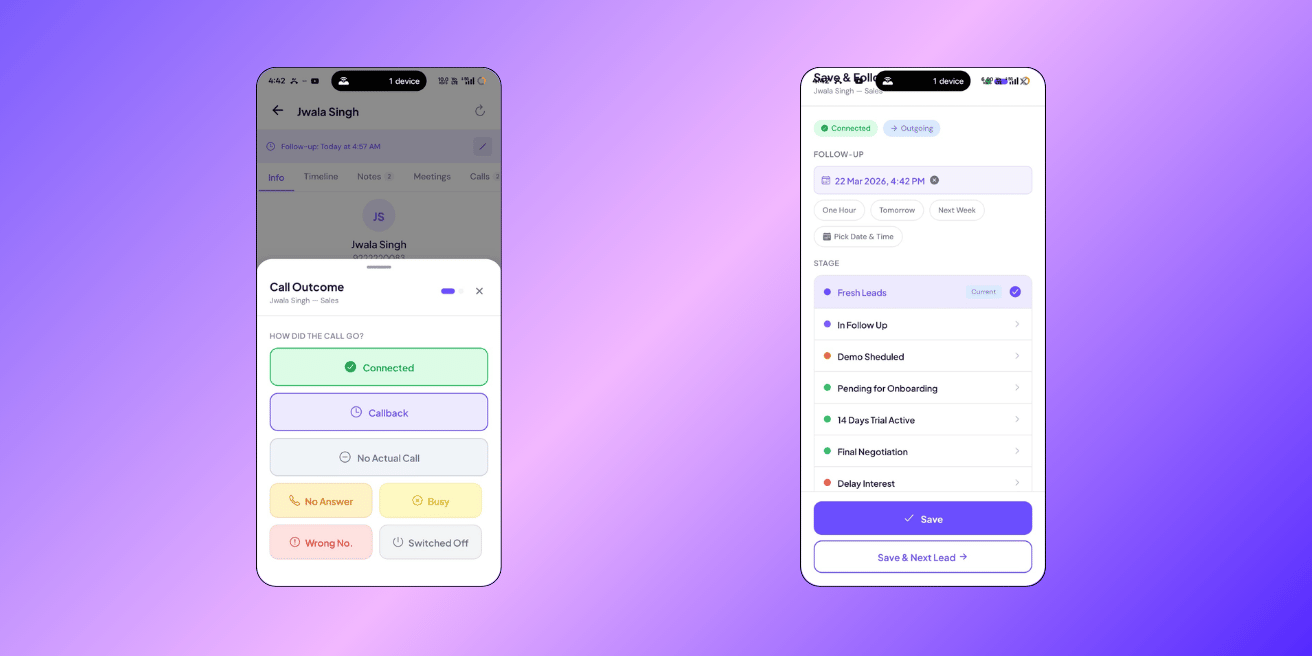
After every call, ClosingFox asks you 3 things: What happened? What’s next? Save. That’s the 3-tap disposal. It takes 5 seconds and replaces notebooks, sticky notes, and “I’ll remember to follow up.”
> Business Impact: Teams using CRM-enforced follow-ups see 3x fewer leads going cold. Without disposal tracking, 40% of leads are never called back after the first attempt. With 3-tap disposal, every call has a recorded outcome, a next action, and a follow-up date — nothing falls through the cracks.
How it works
After a call ends (detected automatically on Android), a sheet slides up from the bottom:
Tap 1 — What happened?
Pick one:
- Connected — you spoke to the customer
- Callback — they asked you to call later
- No Answer — phone rang, nobody picked up
- Busy — line was busy
- Wrong Number — not the right person
- Switched Off — phone was off
Tap 2 — What’s next?
Pick the follow-up date and (optionally) move the lead to a new stage:
- Call back in 1 hour / tomorrow / next week — quick date chips
- Custom date — pick any date and time
- Move to next stage — if the lead is progressing
- Schedule a site visit — opens the visit scheduler
- Not interested — moves to Lost (may need manager approval)
Tap 3 — Save
Done. The call is logged, the follow-up is scheduled, and the lead is updated — all in one go.
Smart follow-up dates
You don’t need to think about when to follow up. ClosingFox sets it automatically based on what happened:
| Outcome | Auto follow-up | Why |
|---|---|---|
| Connected | +2 days | Give them time to think, then check in |
| Callback | +1 day | They asked you to call back |
| No Answer | +4 hours | Try again the same day |
| Busy | +4 hours | Try again soon |
| Wrong Number | None | Lead is flagged — won’t call again |
| Switched Off | None | Lead is flagged — won’t call again |
You can always override the date. But the defaults save you from thinking “when should I call back?”
> Tip: If you had a real conversation (connected 30+ seconds), ClosingFox asks for a short note. This helps your manager understand what happened and helps you remember when you call back next week.
What gets saved
One tap saves everything at once:
- Call log — date, time, duration, connected/missed, who called
- Outcome — Connected, No Answer, Busy, etc.
- Follow-up reminder — you’ll get a notification on your phone when it’s time
- Stage movement — if you moved the lead forward
- Notes — what you discussed (also appears in the lead’s Notes tab, so you can review all conversation summaries in one place)
Everything shows up in the lead’s timeline, Call Logs screen, Notes tab, and your Dashboard.
Follow-up reminders
When a follow-up is due, you’ll see it in three places:
- Phone notification — a push alert at the scheduled time (works offline)
- Dashboard — “Overdue Follow-ups” and “Due Today” counts at the top
- Spot alerts — if you miss a follow-up, Spot flags it in red
What happens if you miss a follow-up?
ClosingFox doesn’t let it slide:
| Situation | Alert | Urgency |
|---|---|---|
| Follow-up was yesterday, zero calls made | “FU Day, No Call” | High (orange) |
| Follow-up is today, only 1 short call made | “FU — Single Attempt” | Medium (yellow) |
| Follow-up is 1+ days overdue | “Overdue Follow-Up” | Critical (red) |
| Active lead, no follow-up set at all | “No Follow-Up Set” | Critical (red) |
Your manager sees these alerts too. No lead gets forgotten.
> Business Impact: The average salesperson juggles 50-100 leads. Without reminders, they follow up with the leads they remember — which are usually the easy ones. With automated follow-ups, they follow up with the leads they should — including the hard ones that actually need attention.
“Wrong Number” and “Switched Off” — what happens
When you mark a call as Wrong Number or Switched Off:
- The lead gets flagged with a red badge
- No follow-up is created (no point calling again)
- The flag prevents accidental re-calling
- Your manager can clear the flag if the number gets corrected
This keeps your team from wasting time on dead numbers.
“Not Interested” — clearance flow
When you mark a lead as Not Interested:
- ClosingFox asks for a reason (Budget issue, Not qualified, Competition, etc.)
- If your pipeline requires manager approval — a clearance request is sent
- Your manager reviews and approves or rejects
- Only after approval does the lead move to Lost
> This prevents premature lead dumping. If a salesperson marks 20 leads as “Not Interested” in one day, the manager sees it and can step in.
Without a call (follow-up only)
Need to set a reminder without making a call? Tap the disposal button and select “No Actual Call”. You can:
- Set a follow-up date
- Add notes
- Move the lead to a different stage
Useful for: meeting notes, WhatsApp conversations, email follow-ups, or just personal reminders.
Common questions
Do I have to fill disposal after every call?
It’s strongly recommended. Without disposal, the lead has no follow-up and will eventually be flagged as “No Follow-Up Set” in Spot alerts. It takes 5 seconds — just pick the outcome and save.
Can I edit a disposal after saving?
You can change the follow-up date anytime from the lead detail screen. The call outcome and notes are saved permanently in the lead’s history — you can always see what happened on each call.
What if I made a call but the disposal sheet didn’t appear?
Go to Call Logs → Pending Calls. Your call should be there. Tap it to confirm and fill the disposal.
Can my manager see my disposals?
Yes. Every disposal is visible in Call Logs and the lead’s timeline. This is by design — it creates accountability and helps managers coach their team.
Next Steps
- Set up auto call detection — so calls trigger disposal automatically
- Configure your pipeline stages — define where leads move after disposal
- Set up assignment rules — make sure your team has leads to call
—
Need help? WhatsApp us or email mail@closingfox.com. We’ll walk you through it.